VL.Rhino
The professional extension of VL.Rhino.3dm — bidirectional Grasshopper live-link, Rhino.Compute integration, advanced geometry creation, and a full PBR material pipeline. Built for studios and practitioners who need more than geometry reading.
| Year | 2024 >>> |
| Type | Plugin |
| Role | Developer |
| Tools | Rhino3D, Grasshopper, vvvv/VL, Stride |
Project Description
Find out more at https://vlrhino.com
VL.Rhino is the professional version of VL.Rhino.3dm, the open-source library for reading Rhino 3D files in vvvv. Where the open-source version covers geometry reading, VL.Rhino adds the full production toolset: live communication with Grasshopper, server-side geometry processing via Rhino.Compute, advanced curve and surface creation, GPU instancing, and a complete PBR material pipeline.
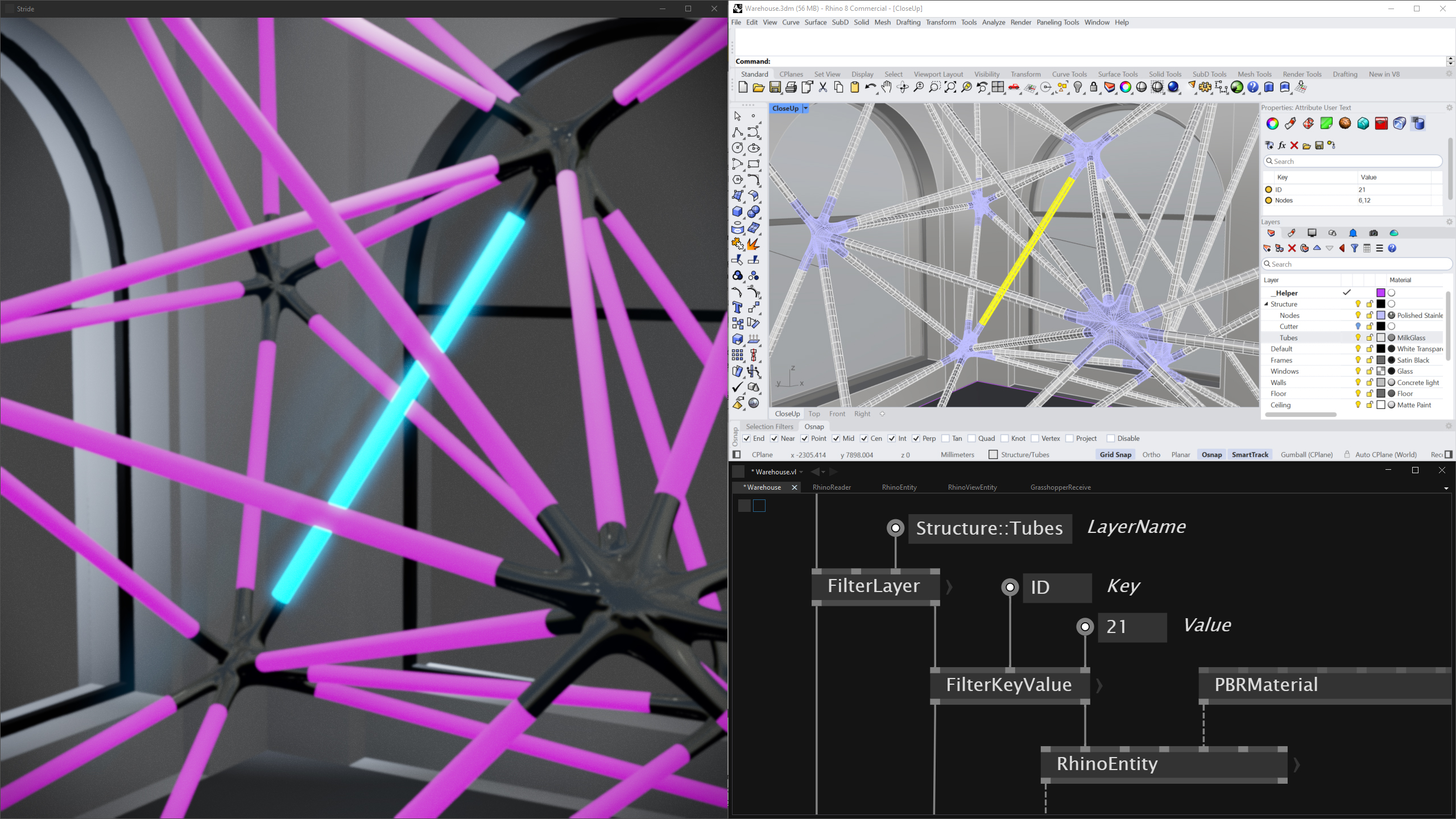
The library treats Rhino as a structured data source, not just a geometry format. User Strings and layer hierarchies translate directly into filterable, addressable objects inside vvvv — enabling BIM-like metadata workflows without leaving the creative environment. Designers work in Rhino; developers wire logic in vvvv. Both sides stay in sync.
No Rhino installation required. The Grasshopper Live-Link is the only feature that needs a running Rhino instance (version 7 or 8).
Try it with vvvv/VL, the visual live-programming environment for .NET
vvvv/VL: http://visualprogramming.net
McNeel’s Rhinoceros 3D: https://www.rhino3d.com/
Get VL.Rhino
VL.Rhino is available as a commercial license. Three tiers are available: Individual, Studio, and Student. Licenses are issued via the shop below — no DRM, trust-based enforcement.
Individual — €99
1 developer seat, up to 3 deployment devices. Commercial use included.
Studio — €289
Up to 5 developer seats, up to 10 deployment devices. For teams and studios.
Student — €35
Non-commercial use only, 1 seat, 1 device. Manually verified. Contact me for access.
Enterprise / Custom Deployment
For larger teams or bespoke deployment scenarios: hello@wolfmoritzcramer.de
Usage / Installation
Go to http://www.vlrhino.com/setup.html
Course
A 3-hour recorded session covering the full VL.Rhino.3dm workflow — geometry, materials, metadata, and project examples — is available at The Node Institute. Covers the foundational concepts that VL.Rhino builds on.
Versions
Tested with vvvv gamma (VL) 7.2 and Rhino3dm 8.17. Rhino files are downward compatible.
Requires .NET 8 (Windows). No Rhino installation needed.
Geometry
Points, PointClouds, Curves, Surfaces, Breps, Extrusions, SubDs, and Meshes are fully supported. Activate the shaded view in Rhino at least once — the render mesh quality set there is the quality you get in vvvv. Geometry is exposed as RhinoGeometry objects carrying the full object context: name, layer, material, bounding box, visibility, user strings, and instance transforms.
Grasshopper Live-Link
Bidirectional real-time communication between vvvv and Grasshopper via shared memory. Send geometry, floats, vectors, and strings from vvvv into a live GH definition — receive the results back in the same frame. Mutex-protected, runs at 60 FPS without blocking. Compatible with the VLinkGH Grasshopper plugin. Requires Rhino 7 or 8.
Materials
Full PBR material conversion from Rhino to Stride: base color, normal, metallic-roughness, occlusion, and emissive maps. Legacy Rhino materials are converted automatically. Embedded textures are extracted directly from the .3dm file — no separate texture files required. A material dictionary gives direct access for replacement with custom VL-made materials.
Layers & User Strings
Full hierarchical layer table with parent/child relationships, colors, and visibility. User Strings on every object — attach arbitrary key/value metadata in Rhino and read it in vvvv to drive logic, filtering, or labeling. Objects inherit layer materials if no explicit material is assigned.
Lights & Cameras
Directional, Point, and Spot lights are converted to Stride light components with color, intensity, and direction. All named Rhino views — perspective and orthographic — are read and converted to Stride camera entities, accessible by name.
Blocks / Instances
Blocks — including nested blocks — are fully supported and rendered efficiently via GPU instancing using per-geometry transform matrices. Instances can also be baked into independent geometry when needed.
Rhino.Compute Integration
Connect to a Rhino Compute server for cloud or local geometry processing. Configurable server address and API key, Bearer token support for compute.rhino3d.com, and a ComputeLink wrapper node for direct use in vvvv patches.